
Agneyastra to the Rescue: Protecting your Firebase Projects before the Tea spills out!
In July 2025, the Tea app 🔗, a mental health and social community platform, experienced a devastating breach that spilled 72,000 images (including 13,000 driver’s license and verification selfies) and over 1.1 million private direct messages onto the internet. The leaks first surfaced on 4chan and quickly spread across forums, torrents, and underground channels.
This was not “just another API key leak.” Instead, it was a story about Firebase misconfigurations, poor data retention practices, and the all too familiar pitfall of assuming “authentication” equals “authorization.”
What Went Wrong at Tea?
The Storage Bucket
Researchers discovered that Tea’s Firebase storage bucket was misconfigured and allowed access to sensitive data. Instead of being restricted, the bucket responded openly and contained:
- ~72,000 images total
- ~13,000 verification selfies and IDs
- ~59,000 other images (DM attachments, posts, etc.)
The Direct Messages
A second issue was found in a separate database that contained 1.1M private messages, some as recent as the week before the leak (404 Media 🔗). These messages contained deeply personal conversations, identifiers like phone numbers, and sensitive relationship and health disclosures.
The Misconfiguration
Firebase API keys are intended to identify the Firebase project, not to control access to your data. The problem was not the API key. It was the rules.
Here is what the Tea app likely had:

And this is how you would expect a secure one looks like:

At first glance, this looks reasonable. But if Anonymous Authentication or Self-Signup is enabled, anyone can generate a token and satisfy `request.auth != null`.
A more secure rule would tie access to specific users or roles:
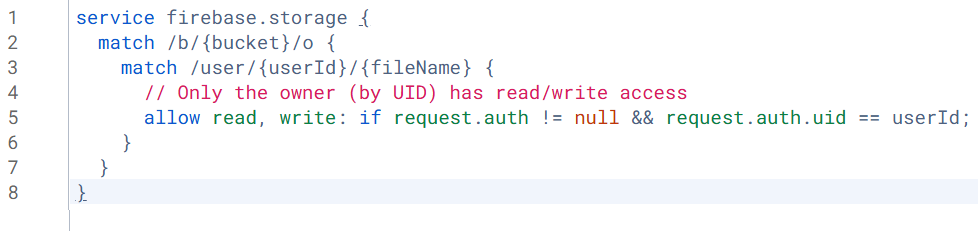
Where we should specify the desired user id which is allowed to perform read and write operations on that bucket and only within their own folder in the bucket.
Without this, Tea’s bucket was effectively public to the world.
Enter Agneyastra: Catching Misconfigs Before Attackers Do
GitHub Link – https://github.com/redhuntlabs/agneyastra 🔗
A tool like Agneyastra could have flagged Tea’s weak Firebase rules instantly.
With a simple scan:
$ agneyastra bucket –auth all -a –key <api_key>
It would have tested:
- Unauthenticated access (public bucket)
- Anonymous auth bypass
- New user sign-up tokens
Using the below mentioned tool flow:
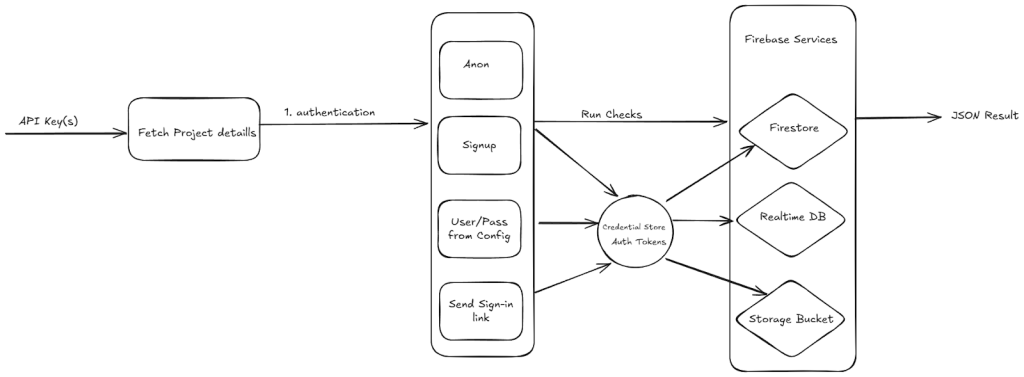
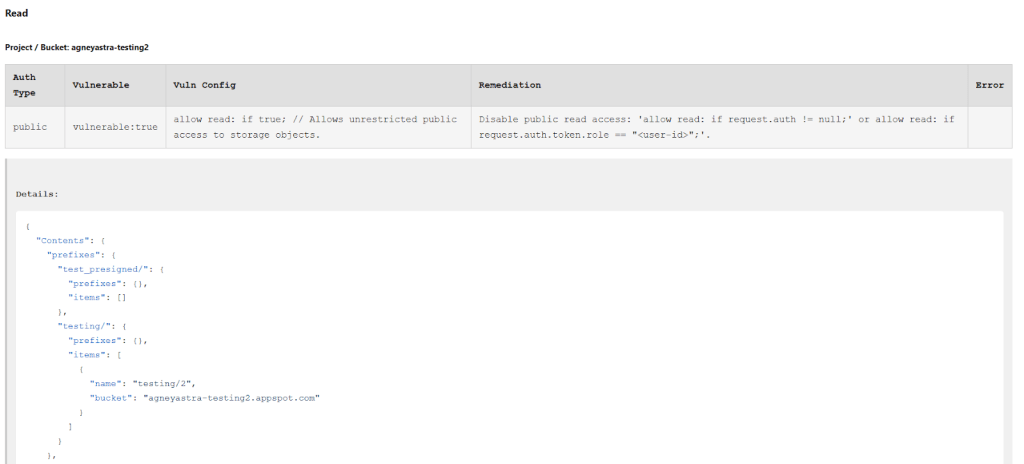
And produced a JSON or HTML report showing:
- Which rules allowed access
- What kind of data could be read, written, or deleted
- Recommended secure rulesets
Had Tea run this check, the breach could have been avoided.
Practitioner Takeaways
- Lock by default — deny-all rules; use short-TTL signed URLs; disable listing.
- Don’t trust request.auth != null — enforce uid/role checks via custom claims.
- Purge legacy — auto-delete IDs/selfies; strict TTLs for DMs/attachments.
- Scan early & often — CI/CD misconfig checks; run Agneyastra pre-release.
Don’t Be the Next Headline for Wrong Reasons
The breach at Tea wasn’t the result of a zero-day or a nation-state attack. It was a simple, avoidable misconfiguration, one that Agneyastra could have flagged in seconds.
Firebase is a powerful tool, but with great fire-power comes a ridiculously open bucket if you’re not paying attention. Don’t be the next “Oops, we leaked your data” headline. Run Agneyastra, audit your Firebase setup, and sleep a little better tonight.
The best part about Agneyastra is that it doesn’t need anything other than a simple API Key, and it fetches the project config automatically! So it can be used by developers and bug bounty hunters alike to instantly assess the security of a leaked Firebase key, or to routinely audit their own apps before someone else does. Just Plug, Scan, and (hopefully not) Panic.
Contributing to Agneyastra
Agneyastra is open-source for a reason. We want the community to take it further – test it, break it, contribute to it, or even fork it into something better. If you’re a bug bounty hunter, developer, or security engineer, we’d love to hear your thoughts, issues, or PRs.
Explore Agneyastra on GitHub – https://github.com/redhuntlabs/agneyastra 🔗
And if you are thinking about security at scale, beyond a single misconfigured Firebase bucket, that is exactly where RedHunt Labs comes in. Our Continuous Threat Exposure Management (CTEM) platform goes a step further by continuously monitoring for exposures like these across your entire attack surface, helping you prioritize what really matters and take precise action before attackers do. Agneyastra is our way of giving back to the community, while our CTEM offering helps enterprises operationalize the same mindset in a systematic way.
.
Learn more about how RedHunt Labs can strengthen your
exposure management.
.