

Take Precise Security Actions On Your Exposures: Powered by Notification & Ticketing Rules
Attack Surface Management (ASM) tools give you an unprecedented view into your organization’s exposures. They surface assets you forgot existed, show you vulnerabilities you didn’t know about, and reveal unexpected connections across your infrastructure.
But once your ASM platform starts delivering hundreds of findings, most teams hit the same wall:
How do you go from knowing about risks to actually taking actions on them?
The flood of alerts can quickly overwhelm your team. If every issue generates a notification, you get noise instead of insight. Analysts start ignoring alerts, and critical issues get buried among false positives and low-priority findings.
Finding exposures is just step one. Acting on them is what actually reduces risk.

Introducing Notification & Ticketing Rules
We built Notification & Ticketing Rules to make sure you can actually use your ASM data to reduce risk, not just collect it. These rules let you:
- Define exactly what conditions should trigger a notification or ticket
- Specify the delivery channel: Slack, email, or your ticketing system
- Decide who needs to know and when they need to know it
With Notification & Ticketing Rules, you’re not stuck with rigid alerting. You build logic that matches your environment, your risk appetite, and your workflows.
Why Contextual Alerts Matter More Than Generic Ones
Every security team has different thresholds for what they consider actionable. For one organization, a medium-severity vulnerability on a critical external asset might demand immediate response. For another, that same vulnerability on an internal dev box might not be worth an alert at all.
Traditional alerting often uses generic severity-based rules: If severity is high, then send an alert.
But in reality, risk is contextual. A high severity finding on a test server with no exposure is not equivalent to a medium severity finding on an internet-facing production asset.
Notification & Ticketing Rules give you the granularity to define what combinations of asset attributes and risk indicators actually matter to your team. No more waking up to a thousand emails/ slack notifications, you decide what triggers your attention, and don’t have to panic for every so-called “crucial” alerts.

Go Beyond Alerts: Drive Accountability with Integrated Ticketing
Security alerts are only valuable if they result in action. Notifications alone, emails, Slack pings, or dashboard updates, don’t guarantee someone takes ownership.
That’s why Notification & Ticketing Rules don’t just send alerts. They can automatically open tickets in the tools your team already uses, including:
- Jira, so developers can track and remediate issues directly in their backlog
- ServiceNow, where security teams can tie findings to their existing ITSM processes
- PagerDuty, for immediate on-call escalation of critical risks
This means every critical exposure is not only seen, but assigned and tracked in systems that ensure accountability and closure. You avoid situations where issues fall through the cracks just because no one was explicitly tasked with remediation.
Building Your Notification/ Ticketing Rules
Think of them as recipes you create, combining:
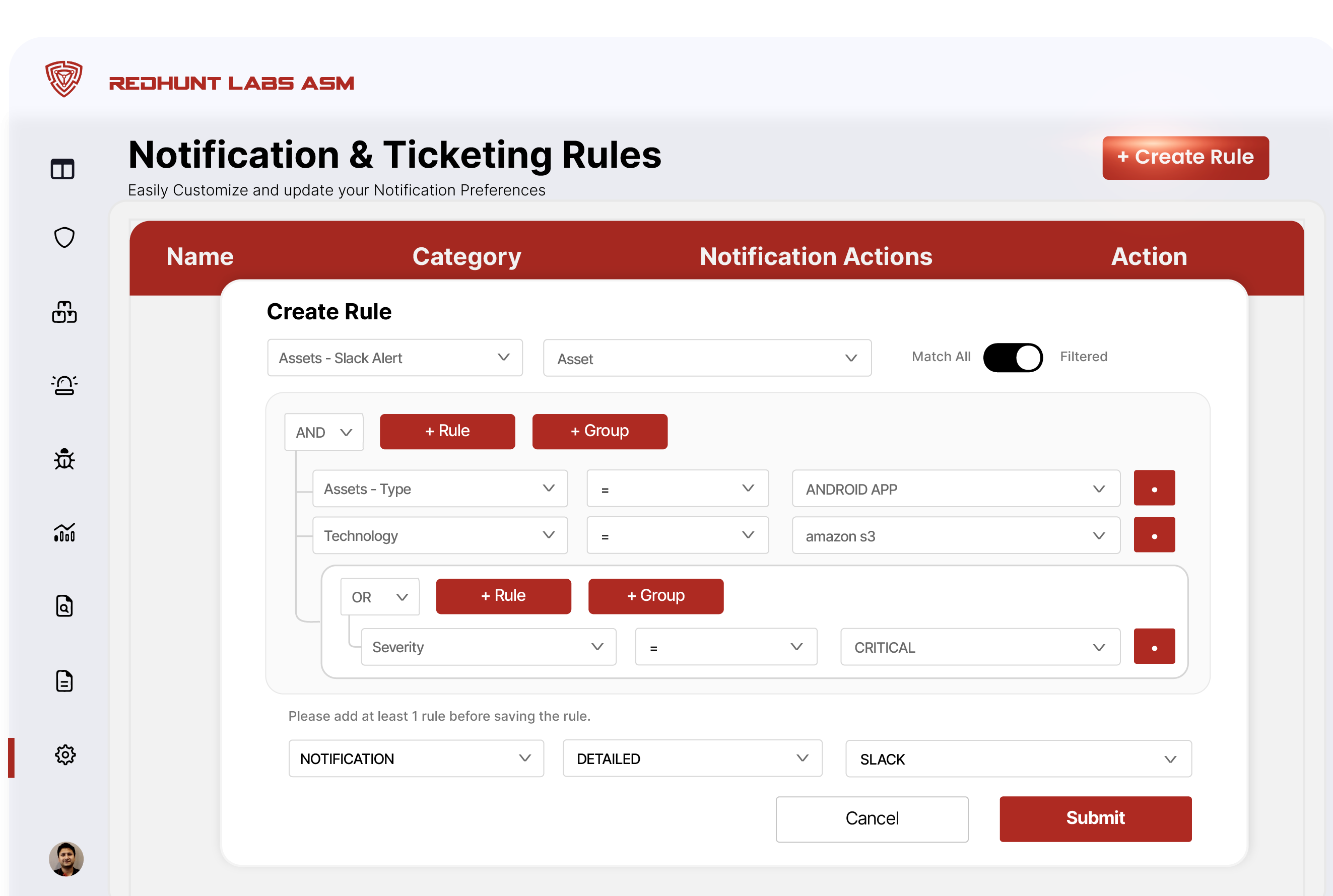
- Step 1 – Trigger Parameter: What conditions should cause an alert? Examples: asset severity, asset type, tags, or the technology stack.
- Step 2 – Adding Logic: How do those conditions relate to each other? Should they all be true? Or is one enough? And this is where our notification & ticketing rules module stands out, grouping AND/OR logic. This lets you layer your conditions and handle complex scenarios with ease.
- Step 3 – Setting Actions: What should happen when the conditions match? Send a Slack message/ fire off an email or create tickets.
Once you set these rules, it goes to work automatically. From discovery to action, everything happens exactly the way you decide.
Real-Life Scenarios That Make Security Folks Nod
- Your developers don’t want Jira tickets for every low-severity finding. Use rules to only create tickets when severity is high or critical, reducing noise and ticket fatigue. For instance you can create one such:

- Your intern deploys a new cloud instance without tagging it correctly. Your notification rules spots an untagged asset in production, instantly pings your Slack #secops channel, and you catch it before it becomes a risk.
- Your CTO hates getting midnight pages about assets in testing. Notifications & Ticketing rules let you exclude test environments from your critical-notification rules.
This isn’t just convenience. It’s sanity-saving precision.

Bridge The Gap Between Discovery and Resolution
The value of ASM isn’t in the sheer volume of information it surfaces. It’s in how you use that information to reduce risk. Security isn’t just about having the data, it’s about acting on it. Start building your Notification & Ticketing Rules today and move from alert overload to actionable outcomes.
Want to try it? Log in to your RedHunt Labs ASM console, or if you want to get started, Book a Demo and learn how Notification Preferences can help your team.
.
Experience Smart Alerting and Action Playbooks Designed for Modern Attack Surfaces!
.